• LinkedIn
  • Twitter
  • Google+
.
|
Launch Pad News
|
RevITup™ How-to Series: Using the Launch Pad’s 650,000 Item B2BWeb Online Store
Posted on July 7, 2009 by 1 Comment

Did you know The Launch Pad’s B2BWeb store  has over 650,000 technology products available at great corporate pricing you can take advantage of?  If you don’t have a store login, you can easily create one right online.

Here’s an overview of all of the store features.

Step 1.  Log in to the Store
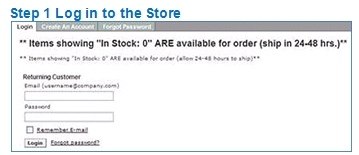
Enter your email address and your password.
If you have any problems, contact your Client Solutions Manager or our Sales Team at 888-920-3450.

Step 2. General Search with screen Product and Manufacturer search categories
After Login you will see a navigation panel in the center of the page
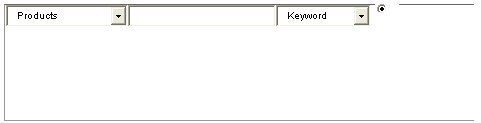
In the field after “products” you can enter search criteria to find the product you need
Or you can view different selection breakdowns by using the top breakdown menu bar shown below

Let’s say you are looking for a netbook (also known as a mini laptop).
If you enter “netbook” in the search field you will see there are 135 found items. We need to reduce the number of choices
because that’s just too much to read through.

Step 3. Search by Manufacturer
Just below the “Full Catalog” is the “Search By” area shown below

So let’s say you wanted and Hewlett Packard Netbook.
Click on the “Manufacturer” section.
You get an alphabetic list as shown below and you can jump to a page by using the alphabet selection list
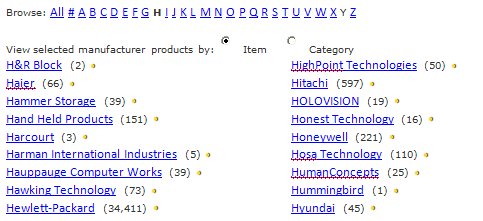
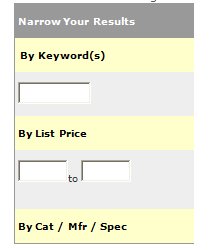
Click on “Hewlett Packard” and you will get over 34,000 items. But to find just notebooks, use the “Narrow Your Results”
field to the right of the screen.

If you type in “netbook” in the keyword field, you will find the netbooks offered by HP.

Or you can view different selection breakdowns by using the top breakdown menu bar shown below

If you click on “Notebooks”, you’ll get a list of notebooks with a list of notebook manufacturers near the top of the section.

Click on “HP” and there’s a list of all HP Notebooks. Then you can use the same “Narrow your Results” box to enter “netbook”
to see the units offered by HP. Same result, just a different approach (more than 1 way to skin a …)

Step 4. Using and Narrowing the Advanced Search
If you click on “Advanced Search” you will be taken to a page with more specific entries for searching. For example, you can
search within a description or by a price range.
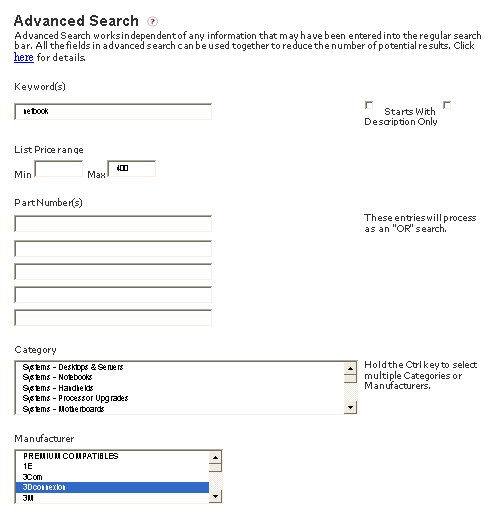
As you can see in the example above, we input “netbook” at the keyword field. Now we have a budget in mind for this purchase.
We left the “Min” field blank and put $400 in the “Max” field. And in the “Manufacturer” field, select “Hewlett Packard” and
click “Advanced Search” at the bottom of the section. Bingo, you’ve got a narrowed down selection to fit your requirements

Step 5. Compare Products
Now let’s use the best tool in this bag of goodies.
You can compare all the specifications of up to 4 different products

Let’s widen the search for this example. On the “Advanced Search” page we put in a “Max” of $600, selected a “Category” of
“System Notebooks” and a “Manufacturer” of Acer and clicked “Advanced Search”.
We found over 30 units matching our needs.

Now we use the drop down box and select “Compare (4 max)”

Then you click the box to the left of up to 4 laptops and click on “Go”.
You will see a spread sheet with a FULL comparison of the items.
Here’s the first 4 lines of information
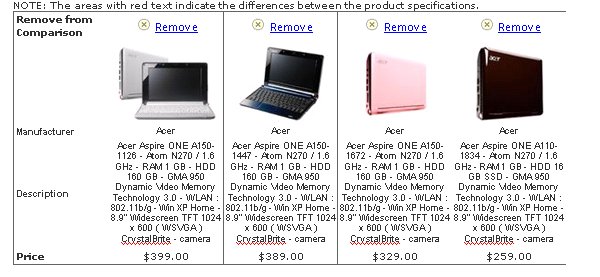
It’s a powerful tool to help you decide which one you want to purchase.

Step 6. Using the Tabs on Product Results
When the item is found, you can navigate through the related tabs

These tabs will show the details of the product.
The Related Products tab will give you the typical items used with this product to be sure you have all the needed items to
successfully use the new product.

For example, for an Acer notebook in the range of less than $600, we click on the Acer Aspire One. Use the bar shown above
and click on “Related Products.” You’ll find a recommended additional item often used is a spare battery. And if you’ve ever
been working on a project and your battery gets depleted, you will appreciate why this is a recommended accessory!

Step 7. Switching Between Custom and Standard Catalog
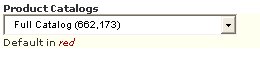
Back on the Home page, you can switch between the full catalog and the customer EasyOrder Supply Printer catalog created for your company by using the drop
down box in the green navigation area
Step 8. Saving Favorites
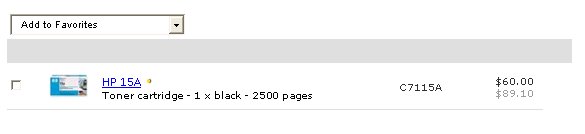
When you find a product you will need again in the future, you can click the box to the left of the item and then use the
drop down box to “Add to Favorites”. On your next visit, it will be saved to the green area at left of the screen listed as
“My Favorites.”

Step 9. Checking Out
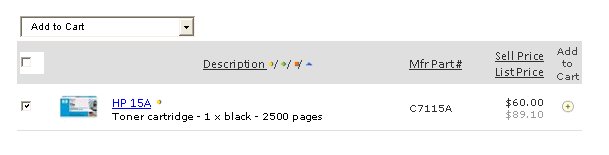
Select the items you want by clicking on the box to the left of the item and from the drop down box at the top, select
“Add to Cart” and click on “Go.” Review your order on the next page and then click on “Checkout” at the bottom left of
the screen. It’s that easy.
Step 10. Checking Order Status
You can check the status of an order previously placed by using the drop down box and selecting “Quotes and Orders”

Step 11. Call us any Time to Help with Solutions Development and Product Recommendations

1-888-920-3450 will connect you with a Client Solutions Manager to help with any Online Shop question

Step 12. The Advantages of Buying from Us

  •  We review every order.
  • Make sure right things are ordered.
  • Free shipping on orders over $399 (if you place the order).
  • We facilitate RMAs on any Launch Pad ordered items.

Posted in Launch Pad News
RevITup™ How-To Series: Using the EasyOrder Printer Supplies Program & Catalog
E-mail is Easy and Security is Easy to Overlook

Related Posts

  • 10 Ways to Save Time on Your Windows 11 PC

    Windows 11 packs many features that you can use to speed up your tasks and
    read more
  • How to Automatically Fix Column Width to Fit Your Data in Excel

    There are numerous ways to change column widths in Excel, but did you know you
    read more
  • The Most Useful Windows 11 Keyboard Shortcuts

    Windows 11 keyboard shortcuts make it easier to navigate your PC without reaching for the
    read more
  • How an 8-Character Password Could be Cracked in Just a Few Minutes

    Security experts keep advising us to create strong and complex passwords to protect our online
    read more
Logging In...

Profile cancel

Sign in with Twitter Sign in with Facebook
or

Not published

  • 1 Reply
  • 1 Comment
  • 0 Tweets
  • 0 Facebook
  • 0 Pingbacks
Last reply was July 12, 2009
  1. derekpm
    View July 12, 2009

    Rather interesting. Has few times re-read for this purpose to remember. Thanks for interesting article. Waiting for trackback

TO WEBSITE >>
launchpadonline.com

CATEGORIES

  • Launch Pad News
  • TechRecs: Cool Tools & Hot Topics
  • Small Business IT Management
  • Small Business Web Strategies
  • IT Solutions – Cloud | Mobile
  • IT Solutions – Stay Secure
  • ITs Easy Being Green
  • RevITup TechCare Client Forum
  • GreenBack Nonprofit Wish List
  • Launch Pad Franchise Forum
  • Launch Pad Partner News

Cloud Computing in Plain English

Copyright © 2026 | Privacy Policy
  • LinkedIn
  • Twitter
  • Google+

Archives

  • January 2025 (1)
  • December 2024 (3)
  • November 2024 (4)
  • October 2024 (2)
  • September 2024 (4)
  • August 2024 (3)
  • July 2024 (2)
  • June 2024 (1)
  • May 2024 (3)
  • April 2024 (4)
  • March 2024 (2)
  • February 2024 (3)
  • January 2024 (4)
  • December 2023 (3)
  • November 2023 (3)
  • October 2023 (3)
  • September 2023 (3)
  • August 2023 (5)
  • July 2023 (3)
  • June 2023 (5)
  • May 2023 (4)
  • April 2023 (3)
  • March 2023 (4)
  • February 2023 (3)
  • January 2023 (3)
  • December 2022 (2)
  • November 2022 (2)
  • October 2022 (2)
  • September 2022 (3)
  • August 2022 (3)
  • July 2022 (2)
  • June 2022 (3)
  • May 2022 (2)
  • April 2022 (2)
  • March 2022 (2)
  • February 2022 (3)
  • January 2022 (2)
  • December 2021 (2)
  • November 2021 (3)
  • October 2021 (3)
  • September 2021 (3)
  • August 2021 (3)
  • July 2021 (2)
  • June 2021 (4)
  • May 2021 (3)
  • April 2021 (2)
  • March 2021 (2)
  • February 2021 (3)
  • January 2021 (2)
  • December 2020 (2)
  • November 2020 (2)
  • October 2020 (4)
  • September 2020 (2)
  • August 2020 (3)
  • July 2020 (2)
  • June 2020 (3)
  • May 2020 (2)
  • April 2020 (3)
  • March 2020 (3)
  • February 2020 (3)
  • January 2020 (4)
  • December 2019 (3)
  • November 2019 (2)
  • October 2019 (4)
  • September 2019 (3)
  • August 2019 (4)
  • July 2019 (2)
  • June 2019 (3)
  • May 2019 (3)
  • April 2019 (3)
  • March 2019 (3)
  • February 2019 (3)
  • January 2019 (4)
  • December 2018 (3)
  • November 2018 (4)
  • October 2018 (3)
  • September 2018 (2)
  • August 2018 (3)
  • July 2018 (3)
  • June 2018 (3)
  • May 2018 (2)
  • April 2018 (3)
  • March 2018 (3)
  • February 2018 (3)
  • January 2018 (3)
  • December 2017 (3)
  • November 2017 (4)
  • October 2017 (3)
  • September 2017 (4)
  • August 2017 (4)
  • July 2017 (4)
  • June 2017 (3)
  • May 2017 (5)
  • April 2017 (4)
  • March 2017 (4)
  • February 2017 (5)
  • January 2017 (4)
  • December 2016 (3)
  • November 2016 (4)
  • October 2016 (4)
  • September 2016 (4)
  • August 2016 (5)
  • July 2016 (4)
  • June 2016 (5)
  • May 2016 (3)
  • April 2016 (4)
  • March 2016 (4)
  • February 2016 (3)
  • January 2016 (3)
  • December 2015 (4)
  • November 2015 (4)
  • October 2015 (3)
  • September 2015 (3)
  • August 2015 (3)
  • July 2015 (3)
  • June 2015 (5)
  • May 2015 (4)
  • April 2015 (6)
  • March 2015 (4)
  • February 2015 (2)
  • January 2015 (5)
  • December 2014 (4)
  • November 2014 (3)
  • October 2014 (8)
  • September 2014 (5)
  • August 2014 (2)
  • July 2014 (3)
  • June 2014 (6)
  • May 2014 (3)
  • April 2014 (6)
  • March 2014 (5)
  • February 2014 (3)
  • January 2014 (5)
  • December 2013 (4)
  • November 2013 (4)
  • October 2013 (6)
  • September 2013 (3)
  • August 2013 (5)
  • July 2013 (6)
  • June 2013 (4)
  • May 2013 (3)
  • April 2013 (4)
  • March 2013 (4)
  • February 2013 (3)
  • January 2013 (5)
  • December 2012 (4)
  • November 2012 (5)
  • October 2012 (5)
  • September 2012 (6)
  • August 2012 (6)
  • July 2012 (6)
  • June 2012 (3)
  • May 2012 (7)
  • April 2012 (6)
  • March 2012 (10)
  • February 2012 (6)
  • January 2012 (5)
  • December 2011 (7)
  • November 2011 (9)
  • October 2011 (4)
  • September 2011 (4)
  • August 2011 (11)
  • July 2011 (14)
  • June 2011 (4)
  • May 2011 (11)
  • April 2011 (8)
  • March 2011 (11)
  • February 2011 (11)
  • January 2011 (21)
  • December 2010 (10)
  • November 2010 (10)
  • October 2010 (8)
  • September 2010 (10)
  • August 2010 (12)
  • July 2010 (8)
  • June 2010 (9)
  • May 2010 (8)
  • April 2010 (7)
  • March 2010 (10)
  • February 2010 (8)
  • January 2010 (6)
  • December 2009 (7)
  • November 2009 (13)
  • October 2009 (11)
  • September 2009 (16)
  • August 2009 (13)
  • July 2009 (16)
  • June 2009 (18)
  • May 2009 (16)