
 Having an internet connection is vital to almost everything we do these days. Thanks to home automation, streaming services, and personal smart devices, it’s important to cover your entire home or workplace with good connectivity. There are multiple options when it comes to blanketing your environment in internet coverage. Mesh networks, Wi-Fi extenders, and access points are the three main choices to consider for most people. We’re going to explain the key differences and advantages of each technology.
Do You Need a Bigger Network?
Before you assume that you need to spend money on new network equipment, there are probably more than a few things you can do to improve the Wi-Fi coverage you already have. To try some of them, head over to 10 Ways to Boost a Weak Wi-Fi Signal and see if you can’t get a free boost from your existing setup.
Wi-Fi Extenders: Could You Repeat That?
These devices are sold under different names, like “extender,” “repeater,” and “booster.” As the names suggest, these devices take your existing Wi-Fi signal from the primary router and repeat it. Repeaters are placed at the edges of your existing Wi-Fi footprint. They intercept the data packets going to and from your Wi-Fi router and then resend them at full signal strength.
Advantages
These devices are usually simple to set up and work well for desktop computers, Wi-Fi printers, and smart TVs that don’t have to move around the home.
Disadvantages
On the downside, the processing time needed to repeat the signal hurts bandwidth and latency. Usually, extenders offer half the bandwidth of your primary router. So if you need the full speed of your internet connection or are a competitive online gamer, repeaters aren’t the right solution for you.
Wi-Fi extenders usually pop up as a separate network. In other words, you will either be connected to the primary router or the extender. Unfortunately, devices like smartphones usually don’t switch over to other networks until you’re entirely out of range for the current one. So, you may have to manually switch networks to ensure you are connected.
Who Should Use Repeaters?
Repeaters are perfect for extending your Wi-Fi footprint at home for general purposes. These include browsing the web, streaming videos, downloading software, and other everyday tasks. We can’t recommend them for medium or large businesses. Still, they’re a suitable solution for a small business that needs to extend Wi-Fi to (for example) cover an entire open-plan office.
Mesh Networks: We Are Borg. Resistance Is Futile.
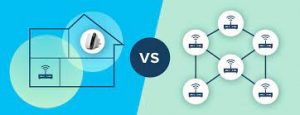
The easiest way to explain a mesh network is by thinking of it as a router hive-mind. Instead of a primary router that gets extended outwards, a mesh network consists of multiple identical routing units. They all talk to each other as well as the devices that are connected to them. The result is essentially one huge distributed router. Large companies have used mesh network technology for decades, but it has only recently become cheap enough to enter the home user market. This is the premier solution to enlarging a Wi-Fi footprint.
Advantages
Once properly installed and configured, a mesh network offers a seamless experience. There’s no need to manually switch between networks as you move around your space. Mesh network routers have specialized hardware that lets them speak to each other in addition to the devices they serve. So they perform much better than Wi-Fi repeaters when it comes to bandwidth and latency.
Disadvantages
Mesh network systems are much more expensive than other solutions. Although you can start with one or two units and then expand your network as funds become available. Mesh networks are more complicated to install and configure than other solutions. Some users may have to pay for professional installation services on top of the hardware costs. Though, modern mesh networks aimed at home users are relatively user-friendly and automate much of the maintenance work. For example, you may not have to update the firmware on each mesh unit individually.
Who Should Use Mesh Networks?
Assuming that you can afford it, mesh networks are the best solution for almost everyone. Businesses of any size should consider mesh networks, especially since they can be expanded as needed, allowing them to grow with the organization. Home users who enjoy home automation and want a seamless movement of smartphones throughout the home should strongly consider a mesh network.
Access Points: The Wi-Fi VIP Room
An access point is a device that offers a local Wi-Fi network of its own, separate from the primary router. It’s connected to the main internet connection using an Ethernet cable, ensuring that it has access to lots of low-latency internet bandwidth.
Advantages
Access points let you serve a specific room or area with its own isolated Wi-Fi network. As a result, they don’t have the bandwidth reduction issues that Wi-Fi repeaters suffer from. Usually, depending on how the network is configured, devices connected to the access point can’t connect to devices on other Wi-Fi networks, even if they share the same internet connection. This is a desirable safety feature in many cases. Some access points also support PoE (Power over Ethernet), so you only have to install the Ethernet cable and don’t have to worry about a nearby power socket.
Disadvantages
The most significant disadvantage of access points is that you need to install Ethernet cabling. That can mean drilling holes in walls and laying cable from the primary internet connection point to the access points. Devices connected to the access point can’t access devices on other Wi-Fi networks. So, for example, if you have a Plex server on your home network, guests using the access point can’t use it. As mentioned above, this can also be seen as an advantage, depending on your needs.
Who Should Use Access Points?
Access points are a great solution when you want to share one internet connection with multiple users. For example, let’s say you are the host of an Airbnb and want to share your fiber connection with your guests. You’d place an access point in the guest room or apartment and connect it to your main router using an Ethernet cable. Guests can then access the internet, and devices connected to the access point can speak to each other (such as home automation devices), but the devices connected to your home local network are safe. The access point approach is popular in hotels or office buildings where one fast internet connection is shared between tenants or guests.
Powerline Extenders: Best of All Worlds?
Powerline extenders are an interesting solution that overcomes many selected disadvantages of the above methods. Powerline technology uses the electrical copper wiring of your home to carry Ethernet traffic. The main powerline unit connects to your internet device (e.g., a fiber router) via Ethernet and then plugs into the wall. You then plug extender units into power sockets wherever you need an internet connection in your home. Typically, powerline extender units offer a wireless access point and Ethernet ports. This makes it easy to hook up devices such as smart TVs or consoles while also using Wi-Fi devices.
Advantages
These devices offer a direct Ethernet connection anywhere you have a power outlet. You can wire up all your Ethernet-equipped devices, literally clearing the air of unnecessary Wi-Fi traffic. Powerline adapters require no laying of cables or drilling holes in walls. Just plug in a few gadgets. The Wi-Fi access points act more like a mesh network. They all broadcast the same Wi-Fi network name and so there’s no need to switch networks manually as you move about.
Disadvantages
Some homes have isolated electrical circuits, which means that powerline extenders in some rooms can’t talk to others. You’ll have to confirm this with whoever built the house or worked on the electrical installation. Typically, Ethernet speeds are limited to 600Mbps at the moment. Gigabit Ethernet devices are available but cost more.
Who Should Use Powerline Extenders?
We think that Powerline extenders are the most convenient and cost-effective solution for most people. They are simple to set up, easy to install and offer performance above most people’s needs.
For more information on solutions for running your businesses’ technology more efficiently, visit our website or contact Megan Meisner at mmeisner@launchpadonline.com or 813 448-7100 x210.
This was originally posted by OnlineTechTips.



