
• LinkedIn
  • Twitter
  • Google+
.
|
TechRecs: Cool Tools & Hot Topics
|
How to Format a Table of Contents in a Word Document
Posted on October 22, 2019 by

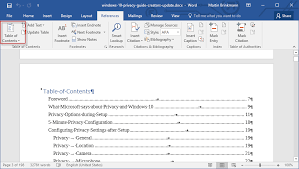
Word’s table of contents, by default, has no formatting. You can add formatting directly, but you’ll have to reapply it every time you update the table. Instead, learn how to modify the table’s underlying styles.

If you’re working on a document that requires a table of contents, Microsoft Word has an easy-to-implement feature based on built-in heading styles. Word uses Heading 1, Heading 2, and so on to build a table of contents; however, the resulting table of contents by default is almost devoid of formatting–it’s downright bland. I’ll show you how to modify the table of contents styles–specifically, we’ll add a bit of color, but you could apply a number of formats.

I’m using Office 365 on a Windows 10 64-bit system, but you can use earlier versions of Word. You can work with your own document or download the demonstration .docx and .doc files. The browser edition will display an existing table of contents and even let you update it, but you can’t add a table of contents or modify a style.

Word’s default table of contents
You might expect heading styles used in your Word document to persist in a table of contents, but that’s not how it works; while this behavior might seem odd at first, it’s by design. As a general rule, a table of contents is fairly bland. The table of contents will not have the same formatting as the heading styles.

Figure A shows a simple table of contents with three heading levels: Heading 1, Heading 2, and Heading 3. All three styles are blue—a font format. I added a direct color format, red, to one Heading 2 instance to be comprehensive. (If you’re using a theme, blue might not be the predominant color.)
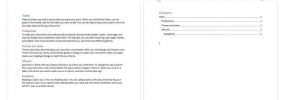
Word doesn’t use the heading styles (whether built-in or custom) applied to the document’s headings to format a table of contents. You could add direct formatting to the table of contents, but every time you update it, you’ll have to reapply the format. Fortunately, there’s an easier solution: Modify the built-in table of contents styles.

Word’s table of contents styles
Word uses a dedicated set of styles to format a table of contents. If you want to permanently format the table of contents, you’ll have to modify the corresponding styles.

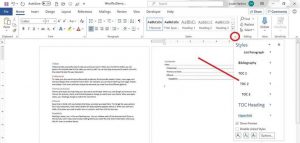
To access the table of contents styles, click the Home tab, and then click the dialog launcher for the Style group to open the Styles. If you’re working in a document that already has a table of contents, you’ll find the table of content styles in use. For instance, the demonstration document uses three levels in the table of contents, so those corresponding styles are available in the pane (Figure B).
If the table of contents styles aren’t in the pane, do the following to add them:

  1. Click the Options button at the bottom of the Style Pane.
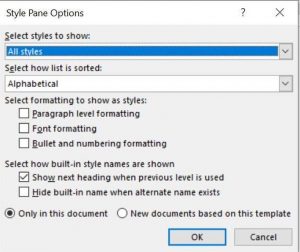
  2. In the resulting dialog, choose All Styles from the Select Styles To Show dropdown.
  3. Select Alphabetical from the Select How List Is Sorted dialog (Figure C).
  4. Click OK. In truth, you added all of the styles to the pane, not just the table of contents styles.
How to modify a table of contents style in Word
Once you have the table of contents styles in the Styles pane, you can easily modify them. To demonstrate, let’s add color to level 2, which corresponds to Heading 2 and TOC 2. Follow these steps:

  1. Thumb down in the styles pane until you find TOC 2.
  2. Click TOC 2’s dropdown and choose Modify from the resulting submenu.
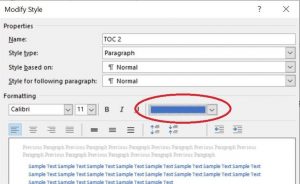
  3. In the resulting dialog, choose blue from the color dropdown (Figure D) and click OK.
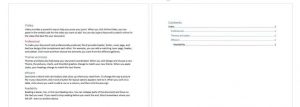
As you can see in Figure E, all level 2 items are now blue. Note that the red heading in the document doesn’t change. We didn’t modify Heading 2–we modified TOC 2. This is why there are two sets of styles—one for the headings in your document and one for each level in the table of contents. Also note that there’s a style for the table’s heading: TOC Heading. Although we added a simple color format, you can use this same technique to completely stylize a table of contents, if warranted.
For more information on solutions for running your businesses’ technology more efficiently, visit our website or contact Megan Meisner at mmeisner@launchpadonline.com or 813 448-7100 x210.

This was originally posted by Susan Harkins  for TechRepublic. Image credit PDFConverter.com

Posted in TechRecs: Cool Tools & Hot Topics, Small Business IT Management
How to Insert a PDF File into a Word Document
Google Authenticator: What It Is and How to Set It Up

Related Posts

  • What Is Patch Tuesday? Microsoft’s Monthly Update Explained

    On the second Tuesday of each month, Microsoft and other tech companies release patches for
    read more
  • 10 Ways to Save Time on Your Windows 11 PC

    Windows 11 packs many features that you can use to speed up your tasks and
    read more
  • How to Automatically Fix Column Width to Fit Your Data in Excel

    There are numerous ways to change column widths in Excel, but did you know you
    read more
  • Why I Use a Privacy Screen When Working in Public

    Privacy screens are an affordable way to protect yourself from nosy colleagues and strangers whilst
    read more
Logging In...

Profile cancel

Sign in with Twitter Sign in with Facebook
or

Not published

TO WEBSITE >>
launchpadonline.com

CATEGORIES

  • Launch Pad News
  • TechRecs: Cool Tools & Hot Topics
  • Small Business IT Management
  • Small Business Web Strategies
  • IT Solutions – Cloud | Mobile
  • IT Solutions – Stay Secure
  • ITs Easy Being Green
  • RevITup TechCare Client Forum
  • GreenBack Nonprofit Wish List
  • Launch Pad Franchise Forum
  • Launch Pad Partner News

Cloud Computing in Plain English

Copyright © 2026 | Privacy Policy
  • LinkedIn
  • Twitter
  • Google+

Archives

  • January 2025 (1)
  • December 2024 (3)
  • November 2024 (4)
  • October 2024 (2)
  • September 2024 (4)
  • August 2024 (3)
  • July 2024 (2)
  • June 2024 (1)
  • May 2024 (3)
  • April 2024 (4)
  • March 2024 (2)
  • February 2024 (3)
  • January 2024 (4)
  • December 2023 (3)
  • November 2023 (3)
  • October 2023 (3)
  • September 2023 (3)
  • August 2023 (5)
  • July 2023 (3)
  • June 2023 (5)
  • May 2023 (4)
  • April 2023 (3)
  • March 2023 (4)
  • February 2023 (3)
  • January 2023 (3)
  • December 2022 (2)
  • November 2022 (2)
  • October 2022 (2)
  • September 2022 (3)
  • August 2022 (3)
  • July 2022 (2)
  • June 2022 (3)
  • May 2022 (2)
  • April 2022 (2)
  • March 2022 (2)
  • February 2022 (3)
  • January 2022 (2)
  • December 2021 (2)
  • November 2021 (3)
  • October 2021 (3)
  • September 2021 (3)
  • August 2021 (3)
  • July 2021 (2)
  • June 2021 (4)
  • May 2021 (3)
  • April 2021 (2)
  • March 2021 (2)
  • February 2021 (3)
  • January 2021 (2)
  • December 2020 (2)
  • November 2020 (2)
  • October 2020 (4)
  • September 2020 (2)
  • August 2020 (3)
  • July 2020 (2)
  • June 2020 (3)
  • May 2020 (2)
  • April 2020 (3)
  • March 2020 (3)
  • February 2020 (3)
  • January 2020 (4)
  • December 2019 (3)
  • November 2019 (2)
  • October 2019 (4)
  • September 2019 (3)
  • August 2019 (4)
  • July 2019 (2)
  • June 2019 (3)
  • May 2019 (3)
  • April 2019 (3)
  • March 2019 (3)
  • February 2019 (3)
  • January 2019 (4)
  • December 2018 (3)
  • November 2018 (4)
  • October 2018 (3)
  • September 2018 (2)
  • August 2018 (3)
  • July 2018 (3)
  • June 2018 (3)
  • May 2018 (2)
  • April 2018 (3)
  • March 2018 (3)
  • February 2018 (3)
  • January 2018 (3)
  • December 2017 (3)
  • November 2017 (4)
  • October 2017 (3)
  • September 2017 (4)
  • August 2017 (4)
  • July 2017 (4)
  • June 2017 (3)
  • May 2017 (5)
  • April 2017 (4)
  • March 2017 (4)
  • February 2017 (5)
  • January 2017 (4)
  • December 2016 (3)
  • November 2016 (4)
  • October 2016 (4)
  • September 2016 (4)
  • August 2016 (5)
  • July 2016 (4)
  • June 2016 (5)
  • May 2016 (3)
  • April 2016 (4)
  • March 2016 (4)
  • February 2016 (3)
  • January 2016 (3)
  • December 2015 (4)
  • November 2015 (4)
  • October 2015 (3)
  • September 2015 (3)
  • August 2015 (3)
  • July 2015 (3)
  • June 2015 (5)
  • May 2015 (4)
  • April 2015 (6)
  • March 2015 (4)
  • February 2015 (2)
  • January 2015 (5)
  • December 2014 (4)
  • November 2014 (3)
  • October 2014 (8)
  • September 2014 (5)
  • August 2014 (2)
  • July 2014 (3)
  • June 2014 (6)
  • May 2014 (3)
  • April 2014 (6)
  • March 2014 (5)
  • February 2014 (3)
  • January 2014 (5)
  • December 2013 (4)
  • November 2013 (4)
  • October 2013 (6)
  • September 2013 (3)
  • August 2013 (5)
  • July 2013 (6)
  • June 2013 (4)
  • May 2013 (3)
  • April 2013 (4)
  • March 2013 (4)
  • February 2013 (3)
  • January 2013 (5)
  • December 2012 (4)
  • November 2012 (5)
  • October 2012 (5)
  • September 2012 (6)
  • August 2012 (6)
  • July 2012 (6)
  • June 2012 (3)
  • May 2012 (7)
  • April 2012 (6)
  • March 2012 (10)
  • February 2012 (6)
  • January 2012 (5)
  • December 2011 (7)
  • November 2011 (9)
  • October 2011 (4)
  • September 2011 (4)
  • August 2011 (11)
  • July 2011 (14)
  • June 2011 (4)
  • May 2011 (11)
  • April 2011 (8)
  • March 2011 (11)
  • February 2011 (11)
  • January 2011 (21)
  • December 2010 (10)
  • November 2010 (10)
  • October 2010 (8)
  • September 2010 (10)
  • August 2010 (12)
  • July 2010 (8)
  • June 2010 (9)
  • May 2010 (8)
  • April 2010 (7)
  • March 2010 (10)
  • February 2010 (8)
  • January 2010 (6)
  • December 2009 (7)
  • November 2009 (13)
  • October 2009 (11)
  • September 2009 (16)
  • August 2009 (13)
  • July 2009 (16)
  • June 2009 (18)
  • May 2009 (16)


