
• LinkedIn
  • Twitter
  • Google+
.
|
TechRecs: Cool Tools & Hot Topics
|
How to Find Your Lost Phone With Google
Posted on June 7, 2016 by

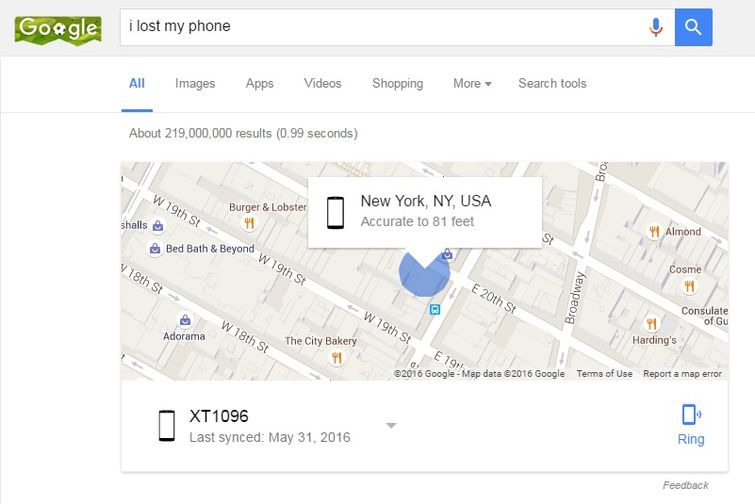
lost_phone_1_w_755When your phone goes missing, your first inclination may be to panic. Marshall Honorof recently posted a great article on Tom’s Guide on how Google can help you find your Android phone right from it’s home page.

While Google used to direct users to a variety of questionably helpful pages, the prolific search engine has now taken matters into its own hands. If you lose an Android phone, Google can help you out right from its homepage.

Google detailed its new Find My Phone features in a blog post celebrating the My Account hub’s first anniversary. Find My Phone is a relatively recent addition to my account, and using it is a dead simple way to track down your phone, whether it’s been left behind at a bar or simply misplaced behind the couch cushions. If you find the prospect confusing, however, Tom’s Guide can walk you through this simple process.

1. Type “I lost my phone” into Google.

Assuming your phone has location services turned on (maybe) and is synced with a Google account (almost definitely), Google can track your phone right from its landing page. The first thing you’ll see is your phone’s location on a map, accurate to within about 100 feet, and often less than 50. You can also command it to Ring right from the landing page, even if your phone’s ringer is turned off.

2. Enter your Google username and password for security purposes.

You’ll also have to confirm your contact information should Google find something fishy.

3. Access Find My Phone

If you haven’t found your phone yet, your next step is to use Google’s Find My Phone functionality. While Google will eventually incorporate this into its landing page for “I lost my phone,” at present, you must access it through the My Account Hub. Visit https://myaccount.google.com/, then click on “Find your phone” near the bottom of the page.

4. Select your phone.

If you have more than one phone or tablet, you’ll need to choose the correct one.

4. Ring or Locate your phone.

Like the “I lost my phone” screen, the first step is to Ring your phone or locate it via GPS. Simply click on either option to make it take effect. If you select Ring, it will cause the phone to start ringing at full volume for 5 minutes.

5. Lock your phone.

If your phone isn’t locked by default, your next option is to do so remotely. Here, you can set up a password for your lock screen, and add a message for someone who might find it. By default, the message is “This phone is lost. Please help give it back.” Users can also attach a number to call.

6. Try calling your phone.

Google recommends that you try calling your phone from either a different phone or through Hangouts. The Find My Phone page provides links to your stored Contacts and Hangouts page.

7. Sign out of your phone.

If you’re convinced that your phone is missing and don’t want anyone else to take advantage of your Google credentials, you can sign out remotely. Simply hit the “Sign out” button.
8. Contact your carrier.

Google recommends that you contact your wireless carrier, like Verizon, AT&T or T-Mobile, next. To do this, visit your provider’s website; Google does not provide any links.

9. Try a lost and found.

Google Maps can use your location to discover the nearest public lost-and-found facility. It’s not a great bet, especially if you live in a big city, but it’s better than nothing. Simply click on the link.

10. Erase your device.

If all else fails and you’re sure your phone isn’t coming back, you can take the nuclear option and erase it remotely. This will wipe the system clean and at least prevent a thief from stealing your data. However, this option will prevent you from using the Locate, Ring and Lock features, so use it only as a last resort.

For more information on solutions for running your businesses’ technology more efficiently, visit ourwebsiteor contact Megan Meisner at mmeisner@launchpadonline.com or 813 448-7100 x210.


 

Posted in TechRecs: Cool Tools & Hot Topics, Small Business IT Management, Small Business Web Strategies, IT Solutions - Cloud | Mobile, IT Solutions - Stay Secure
TechRec – Streamline Your Outlook Inbox with Attachment Save
Small Business IT Services Provider, The Launch Pad CEO Ilene Rosoff Recognized as One of CRN’s 2016 Women of the Channel for the Seventh Consecutive Year

Related Posts

  • What Is Patch Tuesday? Microsoft’s Monthly Update Explained

    On the second Tuesday of each month, Microsoft and other tech companies release patches for
    read more
  • 10 Ways to Save Time on Your Windows 11 PC

    Windows 11 packs many features that you can use to speed up your tasks and
    read more
  • How to Automatically Fix Column Width to Fit Your Data in Excel

    There are numerous ways to change column widths in Excel, but did you know you
    read more
  • Why I Use a Privacy Screen When Working in Public

    Privacy screens are an affordable way to protect yourself from nosy colleagues and strangers whilst
    read more
Logging In...

Profile cancel

Sign in with Twitter Sign in with Facebook
or

Not published

TO WEBSITE >>
launchpadonline.com

CATEGORIES

  • Launch Pad News
  • TechRecs: Cool Tools & Hot Topics
  • Small Business IT Management
  • Small Business Web Strategies
  • IT Solutions – Cloud | Mobile
  • IT Solutions – Stay Secure
  • ITs Easy Being Green
  • RevITup TechCare Client Forum
  • GreenBack Nonprofit Wish List
  • Launch Pad Franchise Forum
  • Launch Pad Partner News

Cloud Computing in Plain English

Copyright © 2026 | Privacy Policy
  • LinkedIn
  • Twitter
  • Google+

Archives

  • January 2025 (1)
  • December 2024 (3)
  • November 2024 (4)
  • October 2024 (2)
  • September 2024 (4)
  • August 2024 (3)
  • July 2024 (2)
  • June 2024 (1)
  • May 2024 (3)
  • April 2024 (4)
  • March 2024 (2)
  • February 2024 (3)
  • January 2024 (4)
  • December 2023 (3)
  • November 2023 (3)
  • October 2023 (3)
  • September 2023 (3)
  • August 2023 (5)
  • July 2023 (3)
  • June 2023 (5)
  • May 2023 (4)
  • April 2023 (3)
  • March 2023 (4)
  • February 2023 (3)
  • January 2023 (3)
  • December 2022 (2)
  • November 2022 (2)
  • October 2022 (2)
  • September 2022 (3)
  • August 2022 (3)
  • July 2022 (2)
  • June 2022 (3)
  • May 2022 (2)
  • April 2022 (2)
  • March 2022 (2)
  • February 2022 (3)
  • January 2022 (2)
  • December 2021 (2)
  • November 2021 (3)
  • October 2021 (3)
  • September 2021 (3)
  • August 2021 (3)
  • July 2021 (2)
  • June 2021 (4)
  • May 2021 (3)
  • April 2021 (2)
  • March 2021 (2)
  • February 2021 (3)
  • January 2021 (2)
  • December 2020 (2)
  • November 2020 (2)
  • October 2020 (4)
  • September 2020 (2)
  • August 2020 (3)
  • July 2020 (2)
  • June 2020 (3)
  • May 2020 (2)
  • April 2020 (3)
  • March 2020 (3)
  • February 2020 (3)
  • January 2020 (4)
  • December 2019 (3)
  • November 2019 (2)
  • October 2019 (4)
  • September 2019 (3)
  • August 2019 (4)
  • July 2019 (2)
  • June 2019 (3)
  • May 2019 (3)
  • April 2019 (3)
  • March 2019 (3)
  • February 2019 (3)
  • January 2019 (4)
  • December 2018 (3)
  • November 2018 (4)
  • October 2018 (3)
  • September 2018 (2)
  • August 2018 (3)
  • July 2018 (3)
  • June 2018 (3)
  • May 2018 (2)
  • April 2018 (3)
  • March 2018 (3)
  • February 2018 (3)
  • January 2018 (3)
  • December 2017 (3)
  • November 2017 (4)
  • October 2017 (3)
  • September 2017 (4)
  • August 2017 (4)
  • July 2017 (4)
  • June 2017 (3)
  • May 2017 (5)
  • April 2017 (4)
  • March 2017 (4)
  • February 2017 (5)
  • January 2017 (4)
  • December 2016 (3)
  • November 2016 (4)
  • October 2016 (4)
  • September 2016 (4)
  • August 2016 (5)
  • July 2016 (4)
  • June 2016 (5)
  • May 2016 (3)
  • April 2016 (4)
  • March 2016 (4)
  • February 2016 (3)
  • January 2016 (3)
  • December 2015 (4)
  • November 2015 (4)
  • October 2015 (3)
  • September 2015 (3)
  • August 2015 (3)
  • July 2015 (3)
  • June 2015 (5)
  • May 2015 (4)
  • April 2015 (6)
  • March 2015 (4)
  • February 2015 (2)
  • January 2015 (5)
  • December 2014 (4)
  • November 2014 (3)
  • October 2014 (8)
  • September 2014 (5)
  • August 2014 (2)
  • July 2014 (3)
  • June 2014 (6)
  • May 2014 (3)
  • April 2014 (6)
  • March 2014 (5)
  • February 2014 (3)
  • January 2014 (5)
  • December 2013 (4)
  • November 2013 (4)
  • October 2013 (6)
  • September 2013 (3)
  • August 2013 (5)
  • July 2013 (6)
  • June 2013 (4)
  • May 2013 (3)
  • April 2013 (4)
  • March 2013 (4)
  • February 2013 (3)
  • January 2013 (5)
  • December 2012 (4)
  • November 2012 (5)
  • October 2012 (5)
  • September 2012 (6)
  • August 2012 (6)
  • July 2012 (6)
  • June 2012 (3)
  • May 2012 (7)
  • April 2012 (6)
  • March 2012 (10)
  • February 2012 (6)
  • January 2012 (5)
  • December 2011 (7)
  • November 2011 (9)
  • October 2011 (4)
  • September 2011 (4)
  • August 2011 (11)
  • July 2011 (14)
  • June 2011 (4)
  • May 2011 (11)
  • April 2011 (8)
  • March 2011 (11)
  • February 2011 (11)
  • January 2011 (21)
  • December 2010 (10)
  • November 2010 (10)
  • October 2010 (8)
  • September 2010 (10)
  • August 2010 (12)
  • July 2010 (8)
  • June 2010 (9)
  • May 2010 (8)
  • April 2010 (7)
  • March 2010 (10)
  • February 2010 (8)
  • January 2010 (6)
  • December 2009 (7)
  • November 2009 (13)
  • October 2009 (11)
  • September 2009 (16)
  • August 2009 (13)
  • July 2009 (16)
  • June 2009 (18)
  • May 2009 (16)

