
 Welcome to The Launch Pad “How-To Series”. Our LiveConnect™ Online Support Portal. With the support portal, our clients have instant access to our enhanced online ticketing system, executive management reports, a personalized knowledge base, invoice history and configurable member access. Not only can you create and track service requests in real time with automated status updates, but you can search your personalized support knowledge base with step-by-step resolutions to your support requests created by our expert help desk team.
Here is how it works:
 1 ) A support login exists on the top left of each page of our website, www.launchpadonline.com. You will see a LiveConnect Client Portal Login link under the blue “Contents menu bar as shown here. You can also login here and save the link to your favorites, www.revitupnow.com/support.
2 ) Enter in your email address and password. If you do not currently have a login, please contact your Client Solutions Manager or send a request to support@launchpadonline.com.
3 ) Once logged in you will see a display of the most recent service tickets and their status.
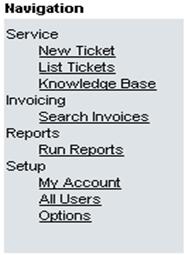 4 ) On the left Menu you have the following options for review. Service gives you access to creating new support tickets, view a list of all past and present tickets, knowledgebase of all solutions from prior tickets. Invoicing shows all invoices for product and services. Reports give the option to run view Service Request Trends as well as Management Reports. Setup allows for creation and management of LiveConnect portal logins for your company as well as change the way you are notified on new service tickets that are created.
5 ) Creating a Service Ticket
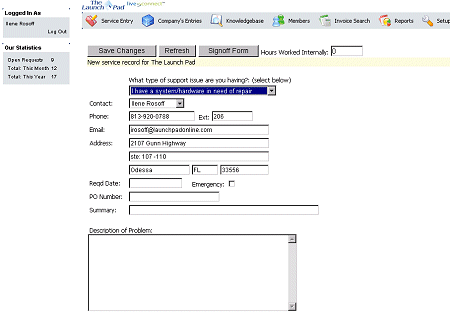
? Select “Service Entry” from the top menu bar in Figure-2.
? A new screen will come up. Figure-3.
? Make sure to select the “Type ” of support issue you have in the first drop down box.
? Fill in all Open Boxes.
? In the “Description” filed please be as detailed as you can with your support issue.
? Once complete please select “Save Changes” just under the Menu Bar.
Your ticket will be sent to The Launch Pad support team and you will be contacted shortly after. You can view status and history of your service request anytime by logging in. You’ll also receive e-mail statuses and alerts and your service request moves through our system.
6 ) Selecting the correct service type.
There are nine different service types on the support portal. Each service type is listed below along with a description.
? “I have a billing question” – Change of Credit Card, Invoice question.
? “I have a system/hardware in need of repair” – Any device that is no longer powering on, printing or functioning in any physical capacity.
? “I have website changes” – Need to change pictures, contact information or additions to your hosted website.
? “I need network or phone cabling” – Just hired a new employee or moving a desk to new location and need network/phone connections.
? “I need pricing, proposal or help with a purchase” – Looking to purchase new computer, server, printer, electronics or software solution and need assistance.
? “I need remote support” – Have a simple issue that does not require an onsite technician.
? “I need to schedule a service visit” – Have an item that is not critical and want to request a service technician onsite.
? “I need to upgrade my systems or network” – Have an older server, laptop or workstation that you would like to bring to current standards.
? “I need web/hosting/e-mail support” – The Launch Pad hosts your website and you are having issues with updating your site or email.
7 ) In the event a support ticket with a screenshot is needed, please follow these steps.
? Only follow these steps if a service ticket has not already been created for this particular issue.
? When an error comes up on your screen, hit the Print Screen button (may show as Prt Scrn). This takes a picture of your current desktop.
? Open up your email and start a new message.
? In the body of the message right click and select paste. This will paste the image of the screen to the message.
? Write a brief description of what was done when this error occurred.
? Send the email with screenshot to support@launchpadonline.com.
? Your ticket will be sent to The Launch Pad support team and you will be contacted shortly after. You can view status and history of your service request anytime by logging in. You’ll also receive e-mail statuses and alerts and your service request moves through our system.
8) Check the Progess of Your Support Request
The first screen after logging in to the Client Portal will automatically show all tickets with the most current ticket at the top. If navigated away from main screen, simply click on “List Ticket” in the left menu bar to view ticket status.
9) Searching the Company Knowledgebase
Every support ticket and resolution is added to the company Knowledgebase. To search for a particular solution within the knowledgebase, simply type in a basic word of what you are searching for and hit enter. Every support ticket that includes your search word will populate. Every resolution is noted in detail to help educate the client of the steps taken to remedy each issue.
9 ) Support requests can also be sent to support@launchpadonline.com .



