• LinkedIn
  • Twitter
  • Google+
.
|
Launch Pad News
|
RevItup™ How-To Series: Searching The Launch Pad Online Store
Posted on July 26, 2009 by

Did you know The Launch Pad has over 650,000 technology products available at corporate pricing you can take advantage of?

Here’s an overview of ways to best use this resource.

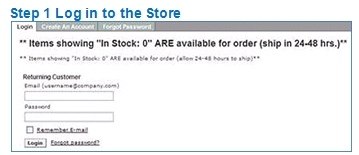
Step 1. Log in to the store


Step 2. After Login you will see a navigation panel on the left.
To then reach your company Printer Supply Catalog simply Click “Company Standards” on the panel.  In the center of the web page you will see your company name followed by Printer Supplies.
Example: My Company Printer Supplies
Select this link and you will be presented with the toner and supplies within your company printer catalog for all of your designated printers.

Select the items you need by clicking on the box to the left of the items.  Use the dropdown box above the items and select “Add to Cart” and then click on “Go.”

Description / / /
Mfr Part #
Sell Price
List Price
Add to Cart

HP 15A
Toner cartridge – 1 x black – 2500 pages C7115A $60.00
$89.10

You will see a summary page showing the items and cost.  Then click on “Checkout” at the bottom of the page.

And what if you’re not looking for an item in your company catalog?

Back on the Products page, click on the “Shop Online” at the upper left of the screen. This brings you to the best deals in the “Spotlite.” Check out these highly useful items at exceptional prices.

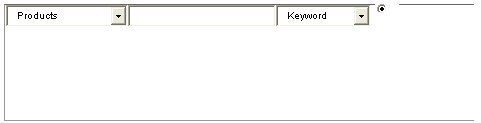
If you are looking for something else, change the product catalog dropdown to “Full Catalog.” To the right of the catalog there is a search bar for “Products.” You can use the dropdown box to search by “Keyword” or “Mfr Part #”.

Remember, the more specific your search, the easier it is to find what you need.

Let’s say you’re looking for a new printer. You could type in “printer” with the dropdown box using “keyword.” You’ll get over 19,000 returns.
Getting a little more specific, let’s say you like HP printers. That entry will return over 2,500 printers.

Then you remember you want a HP Laserjet Printer and now you’re down to over 900.  That’s still a lot to review so let’s get serious and use the Advanced Search option.   To the right of the “Search” button is the “Advanced Search” icon.   The screen looks different and that’s because it does a lot more for you.

Let’s say you’ve got a budget of between $150 and $200 for the HP Laserjet Printer. You can fill in the keywords and then enter the “Min” and “Max” in the “List Price range” and click on “Advanced Search.”

Now you’re down to 138 items, but there’s more in the list than just printers.

So for the best result in this search, enter the same criteria and in the “Category” box highlight “Output Device – Printers” and start the search. The system will find 2 items matching your needs.

How can you find the best type of product to fit your needs? It’s easy by using the Comparison Page.

Go back at the “Product Catalogs” drop down box, select “Full Catalog.” The section below it is “Browse by Category” which contains subsections by types of items to choose from. Or about a quarter of the distance down the page from the top you can use the gray tabs with green dividers. This is just a different way of selecting the category you want.

For example, you could click on “Monitors” from the gray bar and view over 450 options.

To compare items go to the drop down box at the top of the monitor list and select “Compare (4 max.). Put a check mark next to up to 4 different monitors. Click on “Go.” You will get a comparison table of the products to help you decide which item is the best fit for your needs.

If you need help either using the store or picking out the right products, please give our Client Solutions team a call 888-920-3450 x1 or take advantage of our LiveChat on the top bar of every store page.


Posted in Launch Pad News
The Launch Pad #38 of Tampa Bay Fast 50
RevITup™ How-To Series: Managing your Inbox

Related Posts

  • 10 Ways to Save Time on Your Windows 11 PC

    Windows 11 packs many features that you can use to speed up your tasks and
    read more
  • How to Automatically Fix Column Width to Fit Your Data in Excel

    There are numerous ways to change column widths in Excel, but did you know you
    read more
  • The Most Useful Windows 11 Keyboard Shortcuts

    Windows 11 keyboard shortcuts make it easier to navigate your PC without reaching for the
    read more
  • How an 8-Character Password Could be Cracked in Just a Few Minutes

    Security experts keep advising us to create strong and complex passwords to protect our online
    read more
Logging In...

Profile cancel

Sign in with Twitter Sign in with Facebook
or

Not published

TO WEBSITE >>
launchpadonline.com

CATEGORIES

  • Launch Pad News
  • TechRecs: Cool Tools & Hot Topics
  • Small Business IT Management
  • Small Business Web Strategies
  • IT Solutions – Cloud | Mobile
  • IT Solutions – Stay Secure
  • ITs Easy Being Green
  • RevITup TechCare Client Forum
  • GreenBack Nonprofit Wish List
  • Launch Pad Franchise Forum
  • Launch Pad Partner News

Cloud Computing in Plain English

Copyright © 2026 | Privacy Policy
  • LinkedIn
  • Twitter
  • Google+

Archives

  • January 2025 (1)
  • December 2024 (3)
  • November 2024 (4)
  • October 2024 (2)
  • September 2024 (4)
  • August 2024 (3)
  • July 2024 (2)
  • June 2024 (1)
  • May 2024 (3)
  • April 2024 (4)
  • March 2024 (2)
  • February 2024 (3)
  • January 2024 (4)
  • December 2023 (3)
  • November 2023 (3)
  • October 2023 (3)
  • September 2023 (3)
  • August 2023 (5)
  • July 2023 (3)
  • June 2023 (5)
  • May 2023 (4)
  • April 2023 (3)
  • March 2023 (4)
  • February 2023 (3)
  • January 2023 (3)
  • December 2022 (2)
  • November 2022 (2)
  • October 2022 (2)
  • September 2022 (3)
  • August 2022 (3)
  • July 2022 (2)
  • June 2022 (3)
  • May 2022 (2)
  • April 2022 (2)
  • March 2022 (2)
  • February 2022 (3)
  • January 2022 (2)
  • December 2021 (2)
  • November 2021 (3)
  • October 2021 (3)
  • September 2021 (3)
  • August 2021 (3)
  • July 2021 (2)
  • June 2021 (4)
  • May 2021 (3)
  • April 2021 (2)
  • March 2021 (2)
  • February 2021 (3)
  • January 2021 (2)
  • December 2020 (2)
  • November 2020 (2)
  • October 2020 (4)
  • September 2020 (2)
  • August 2020 (3)
  • July 2020 (2)
  • June 2020 (3)
  • May 2020 (2)
  • April 2020 (3)
  • March 2020 (3)
  • February 2020 (3)
  • January 2020 (4)
  • December 2019 (3)
  • November 2019 (2)
  • October 2019 (4)
  • September 2019 (3)
  • August 2019 (4)
  • July 2019 (2)
  • June 2019 (3)
  • May 2019 (3)
  • April 2019 (3)
  • March 2019 (3)
  • February 2019 (3)
  • January 2019 (4)
  • December 2018 (3)
  • November 2018 (4)
  • October 2018 (3)
  • September 2018 (2)
  • August 2018 (3)
  • July 2018 (3)
  • June 2018 (3)
  • May 2018 (2)
  • April 2018 (3)
  • March 2018 (3)
  • February 2018 (3)
  • January 2018 (3)
  • December 2017 (3)
  • November 2017 (4)
  • October 2017 (3)
  • September 2017 (4)
  • August 2017 (4)
  • July 2017 (4)
  • June 2017 (3)
  • May 2017 (5)
  • April 2017 (4)
  • March 2017 (4)
  • February 2017 (5)
  • January 2017 (4)
  • December 2016 (3)
  • November 2016 (4)
  • October 2016 (4)
  • September 2016 (4)
  • August 2016 (5)
  • July 2016 (4)
  • June 2016 (5)
  • May 2016 (3)
  • April 2016 (4)
  • March 2016 (4)
  • February 2016 (3)
  • January 2016 (3)
  • December 2015 (4)
  • November 2015 (4)
  • October 2015 (3)
  • September 2015 (3)
  • August 2015 (3)
  • July 2015 (3)
  • June 2015 (5)
  • May 2015 (4)
  • April 2015 (6)
  • March 2015 (4)
  • February 2015 (2)
  • January 2015 (5)
  • December 2014 (4)
  • November 2014 (3)
  • October 2014 (8)
  • September 2014 (5)
  • August 2014 (2)
  • July 2014 (3)
  • June 2014 (6)
  • May 2014 (3)
  • April 2014 (6)
  • March 2014 (5)
  • February 2014 (3)
  • January 2014 (5)
  • December 2013 (4)
  • November 2013 (4)
  • October 2013 (6)
  • September 2013 (3)
  • August 2013 (5)
  • July 2013 (6)
  • June 2013 (4)
  • May 2013 (3)
  • April 2013 (4)
  • March 2013 (4)
  • February 2013 (3)
  • January 2013 (5)
  • December 2012 (4)
  • November 2012 (5)
  • October 2012 (5)
  • September 2012 (6)
  • August 2012 (6)
  • July 2012 (6)
  • June 2012 (3)
  • May 2012 (7)
  • April 2012 (6)
  • March 2012 (10)
  • February 2012 (6)
  • January 2012 (5)
  • December 2011 (7)
  • November 2011 (9)
  • October 2011 (4)
  • September 2011 (4)
  • August 2011 (11)
  • July 2011 (14)
  • June 2011 (4)
  • May 2011 (11)
  • April 2011 (8)
  • March 2011 (11)
  • February 2011 (11)
  • January 2011 (21)
  • December 2010 (10)
  • November 2010 (10)
  • October 2010 (8)
  • September 2010 (10)
  • August 2010 (12)
  • July 2010 (8)
  • June 2010 (9)
  • May 2010 (8)
  • April 2010 (7)
  • March 2010 (10)
  • February 2010 (8)
  • January 2010 (6)
  • December 2009 (7)
  • November 2009 (13)
  • October 2009 (11)
  • September 2009 (16)
  • August 2009 (13)
  • July 2009 (16)
  • June 2009 (18)
  • May 2009 (16)