
 You’ve got a file to share—a huge document, video presentation, or set of images. You can’t just email it, because you’re running up against your—or your recipient’s—email size limit. Here are several ways you can share large files over the internet.
We’re going to look at a few different ways you can get large files to someone, and they’re all useful in different situations. Maybe it’s a one-time thing, and you just need to get a file to someone quickly. Or maybe it’s something you’re going to need to do regularly. Whatever your needs, we’ve got you covered.
You Might Be Able to Use Email After All
Most email services—especially corporate services—place limits on the size that message attachments can be. And that can certainly be annoying.
Even mainstream email providers like Gmail, Outlook.com, and Yahoo don’t support sending very large files. Gmail and Yahoo both have a 25 MB limit, while Outlook limits you to 20 MB. Despite their limitations, these email providers typically offer a workaround for large file sharing using cloud sharing services.
If you try to send a file that’s too large in Gmail or Outlook.com, you’re automatically given the chance to upload that file to the respective cloud services (Google Drive and OneDrive), and then include a link to the file in your email.
Let’s take a closer look at Gmail, for example. After you compose a message in Gmail, you’re given the opportunity to attach a file. If Gmail determines that the file is too large, you’ll receive a message like this:
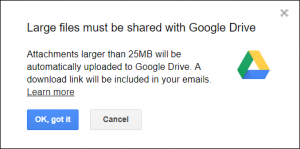
If you click the “OK, Got It” button, Gmail automatically uploads the file to Google Drive and prepares a link to include in your message. When you send the message, you’re given the chance to edit the permissions of the file before the message is sent. This can be handy if your document contains sensitive data. Google supports uploading files up to 5 TB in size, as long those files are not converted to a Google doc, slide show, or spreadsheet. In those cases, the upload limit is 50 MB for docs and slide shows, and 100 MB for spreadsheets. And, of course, you’re limited by the amount of space you have in your Google Drive account. Typically, though, it’s enough for most files.
Much like Gmail, Outlook.com offers their own workaround for large file sharing using their OneDrive cloud storage service. In this case, it doesn’t happen automatically. You’ll need to upload the file to OneDrive first, and then you can include a link to it in your email. OneDrive limits uploaded file size to 10 GB.
Yahoo doesn’t have a dedicated file sharing service, but it plays well with others. You can link a DropBox account to Yahoo in your DropBox settings, or use a similar cloud service. Keep in mind that just like Yahoo, most email providers support plugins for your favorite cloud services.
Compress Your File If It’s Just a Little Too Big
If you have a file (or set of files) that’s just a little too big, you can always try compressing the file and then sending that over email. What does zip the data mean? Let’s take a look.
Compression tools compress your data into a new file that takes up less disk space. How much you can compress data depends on what kind of data you have. You can often compress things like Office documents and PDFs a pretty good bit. Files that already have compression built in—like many image formats—won’t compress much at all. You can compress a whole folder full of files into a single compressed file that’s easier to move around.
Both Windows and macOS have built-in compression tools, but third party tools like WinZip and 7-Zip (our favorite) offer additional advantages. You can encrypt and password protect your compressed file, for example.
You can also use those tools to break apart a zip file into multiple parts. If you have a really large set of files, you can break up the compressed files into parts that you can send via email. The recipient can then use the same tool to easily reconstitute the parts into a single file on the other end. Although, to be honest, breaking up a compressed file like this can be enough hassle that it’s usually worth looking into better options, like a cloud storage service.
So What About Cloud Storage?
There are dozens of cloud storage services out there. Most offer a free level of service where you get some storage space, and paid levels where you can get more. You can use any of them to share large files. All you have to do is upload your file and then provide the recipient with the download link. If you’re sharing files regularly with someone, you can even create a shared folder so they can grab anything you drop into it without you having to provide links all the time.
There are the obvious cloud storage providers, of course—Google Drive, Microsoft OneDrive, Amazon Drive, and DropBox. There are others, too—like Mega—that offers lots of space for free and are intended for helping you share large files.
Take your time browsing for a solution that works best for you. Each of them offer their own advantages and add-on features. And all of them have at least some level of free storage, making them easy to try out.
You Can Use FTP If You Have a Server and Need to Transfer Files Often
For some of the more tech savvy readers out there in need of a regular file sharing tool, FTP is the way to go. FTP, or File Transfer Protocol, is another way to share files, big and small, over the internet. Even if you’re not familiar with the term FTP, you’ve most likely used it when downloading a digital product or torrent online.
You can set up an FTP server on your own computer, but you’ll need to open that computer up to the internet so that people can access it to download files. You’ll also need to leave that computer on all the time, and you may want to check if your ISP places any restrictions on running a server. If you already have an internet-connected server (maybe you rent a web server for hosting a website, for example), you can almost always set up an FTP server that way and not have to deal with some of those issues.
There are plenty of free FTP products that allow you to setup and manage a server or take advantage of their established server. An FTP server is similar to a cloud service in that you can store data there. You can provide someone credentials to login and download the file, or maybe even send them a link to access it. A few of the more well known FTP products include FileZilla, Core FTP, and CyberDuck. If you’ve got the resources, try setting one up!
For Truly Large Data Sets, Maybe Just Mail Someone an External Drive
External drives are pretty cheap these days. This Western Digital 2 TB drive, for example, sells for just $65. If you need to get a really big set of data to someone, you might be better off just copying the data to an external drive, and then sending it to them in the mail. You can always have them return it when they’re done.
While the thought of people waiting for a drive to arrive in the mail might put you off, you have to weigh that delay against the problems of transferring large sets of data over the internet. Even with a fast connection, uploading and then downloading a terabyte of data can take quite a while. And it’s also likely to eat through any data cap your ISP might impose.
You can also encrypt the drive if you’re concerned about privacy. Windows Professional and macOS both come free encryption tools, but for something like this we recommend the free VeraCrypt utility. VeraCrypt makes it really easy to create an encrypted container and fill it with whatever you want to protect.
or more information on solutions for running your businesses’ technology more efficiently, visit our website or contact Megan Meisner at mmeisner@launchpadonline.com or 813 448-7100 x210.
This was originally posted by HowtoGeek.



